
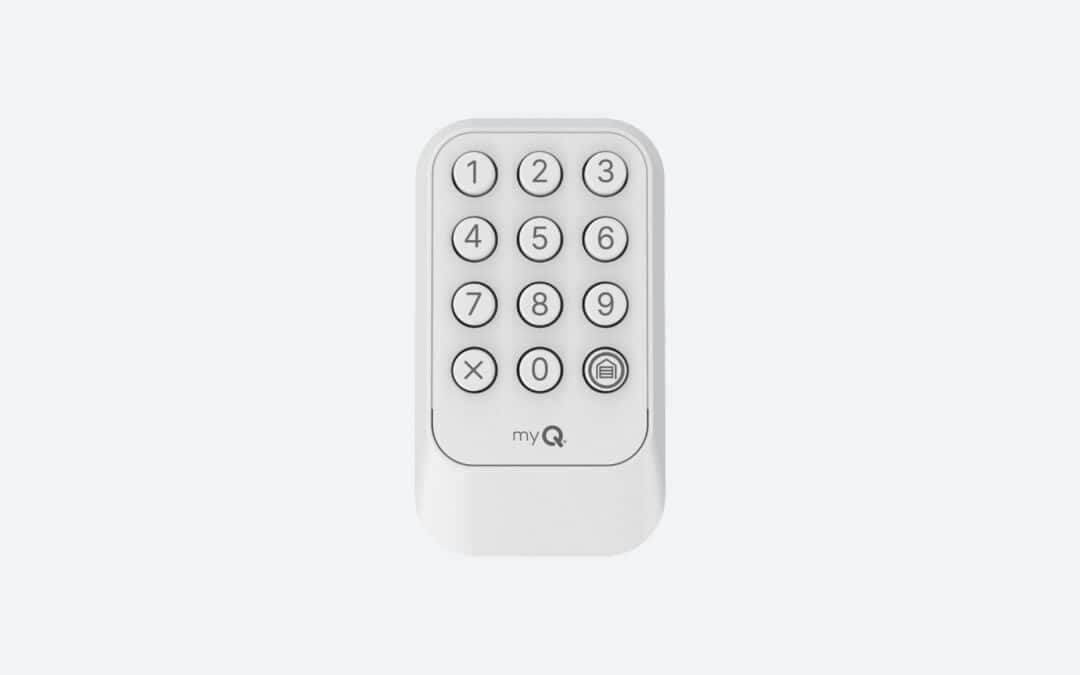
If you’re weighing the Chamberlain CHU48 vs CH348, here’s the short version: the CHU48 is the universal keypad, and the CH348 is built for Chamberlain-family openers. Both cost about the same and both handle our winters. What settles the question is your opener’s brand and age, plus the color of its Learn button. If your opener won’t pair, contact us and we’ll sort it out.
Chamberlain CHU48 vs CH348: The Quick Answer for Chicagoland Homeowners
The CHU48 is the universal pick, working with most openers made after 1993 that have safety sensors, including Genie, Wayne Dalton, Linear, Stanley, Guardian, Sommer and Ryobi, plus Chamberlain, LiftMaster and Craftsman. The CH348 is Chamberlain’s native keypad, designed for Chamberlain, LiftMaster and most Craftsman openers made after 1997 that use Security+ protocols.
We’ve helped Chicagoland homeowners with keypad and opener questions since 1981, and this Chamberlain universal keypad comparison will help you choose with confidence.
CHU48 vs CH348 Side-by-Side Comparison
The table below covers the practical differences between the two keypads. Both are illuminated, support temporary PINs and one-touch close, carry a 1-year warranty, and measure about 2.89″ W x 1.24″ D x 4.97″ H.
| Feature | CHU48 | CH348 |
|---|---|---|
| Compatibility | Universal | Chamberlain-family |
| Supported brands/opener families | Chamberlain, LiftMaster, Craftsman, Genie, Overhead Door, Linear, Stanley, Wayne Dalton, Raynor, Performax, Xtreme Garage, Sommer, Ryobi and more | Chamberlain, LiftMaster and most Craftsman openers made after 1997 |
| Weather resistance | Designed for all weather, -4°F to +149°F | Designed for all weather, -4°F to +149°F |
| Power/battery | Included 9-volt battery | Included 9-volt battery |
| Programming approach | Hold 0 and 3, press Learn, enter PIN, press HOME three times | Hold 0 and 3, press Learn, enter PIN, press HOME twice |
| Best for | Non-Chamberlain brands or mixed households | Chamberlain, LiftMaster or Craftsman openers |
One exception to know: the Craftsman Series 100 isn’t covered by the CH348. If you’re comparing Chamberlain and LiftMaster openers, our guide on LiftMaster vs Chamberlain openers explains how closely the two are related.
Price, Weather Rating and Battery at a Glance
Chamberlain lists both keypads at around $45, with a product-page price of $44.99 for each. The weather and power specs match as well: each keypad is rated for -4°F (-20°C) to +149°F (+65°C), and a 9-volt battery comes in the box.
The real difference is setup. Because the CH348 is built natively for Chamberlain’s Security+ protocols, it pairs with Chamberlain and LiftMaster openers in fewer steps (two presses of HOME vs. three), while the CHU48’s multi-frequency setup takes an extra step to support mixed-brand households. You can also tell them apart at a glance: the CH348 has a red LED and the CHU48 a blue one.
Which Keypad Fits Your Opener? Brand, Age and Learn Button Color
Start with the opener’s brand and manufacture date, then check the Learn button color. The Learn button is the button on the motor unit that puts the opener into pairing mode. You’ll usually find the model number and Learn button on the motor unit or under the light cover. Use a stable ladder and disconnect power when needed.
Brands the CHU48 Supports
The CHU48 lists these brands and start years. Check your opener’s manual or model number to confirm yours.
-
Chamberlain, LiftMaster and Craftsman: 1993 to current.
-
Genie and Overhead Door: 1995 to current.
-
Linear: 1997 to current.
-
Stanley: 1998.
-
Wayne Dalton: 1999.
-
Raynor: 1993 to current.
-
Performax and Xtreme Garage: 2016 to current.
-
Sommer: 2013 to current.
-
Ryobi: 2016 to current.
-
Guardian, Do-It, Garage Master, Master Mechanic, Moore-O-Matic and True Value are also listed.
If you’re unsure which keypad matches your opener, reach out to our team before you order.
Learn Button Colors Explained (and Why Color Alone Isn’t Enough)
Here’s how the colors break down:
-
White: Security+ 3.0, BLE LR 2.4 GHz, E Code.
-
Yellow: Security+ 2.0, 315 or 390 MHz, E code.
-
Purple/brown: Security+, 315 MHz, D code.
-
Red/orange: Security+, 390 MHz, D code.
-
Green: Billion Code CGI, 390 MHz. Only the CHU48 lists green.
A purple button can fade over time and look brown. Our advice is to avoid relying on color alone. The model year and opener generation matter too, so confirm the model number and manual before buying or programming.
Before you buy, check these:
-
Opener brand
-
Model number
-
Manufacture year
-
Learn button color
-
Whether your existing keypad is wired or wireless
Built for Chicagoland Winters: Freeze-Thaw Cycles, Battery Life and Durability
Chicagoland winters are tough on anything mounted outside. Sub-zero cold slows the chemical reaction inside a 9-volt battery, so keypads often lag or go dark on the coldest mornings, and repeated freeze-thaw cycles let moisture seep into seams, expand as it freezes and stress the housing and seal over time. Both keypads are rated down to -4°F, which covers most winter days, but a deep January cold snap can push past that.
Here are our cold-weather tips:
-
Keep a spare 9-volt battery on hand, and replace it at the first sign of lag.
-
Check the keypad’s mounting and seal each fall, before the first freeze.
-
Mount it under an overhang if possible, away from areas where snow or ice builds up.
Garage Door Keypad Replacement in Chicago: DIY Tips and When to Call a Pro
Garage door keypad replacement in Chicago is usually DIY-friendly. Program the CHU48 before installation. Mount it within sight of the door, at least 5 feet (1.5 m) high, out of children’s reach and away from moving parts. Clear the door of obstructions and make sure the opener light works. The door may move during programming, so keep people and pets clear while you test.
These are general steps for yellow, purple/brown, orange or red buttons. Confirm them against your opener’s manual and model number.
-
Hold 0 and 3 until the LEDs stay solid.
-
Press and release the opener’s Learn button.
-
Enter a 4-digit PIN.
-
Press HOME three times within 15 seconds on the CHU48 (green buttons on Chamberlain-family openers follow this sequence too), or twice within 20 seconds on the CH348.
-
When the garage door moves, press and release HOME again within 3 seconds.
White-button openers can pair through the myQ app, the Learn button or the control panel. For white-button openers, the Learn button and control panel methods use a 4- to 8-digit PIN entered within 30 seconds of pressing Learn. Check the manual that came with your keypad for more detail.
When Your Opener Is Outdated or Won’t Program
Common problems include a keypad that doesn’t respond, a PIN that isn’t accepted, or pairing that fails after a battery swap. Start with a fresh battery and recheck your model and Learn button color.
Call a pro if your opener is older or unsupported, if there’s no response after a reset, or if the problem goes beyond the keypad. Sometimes the fix is an upgrade. We offer garage door opener repair and opener installation across Chicagoland and Southeast Wisconsin, including same-day emergency opener repair. If the door itself is the issue, we also handle garage door repair.
Get Keypad and Opener Help from Overhead Garage Door
We’re family-owned and based in Ingleside. Our technicians have at least five years of industry experience, and they go through background checks and drug tests. Ongoing performance reviews keep them sharp. They arrive in uniform with photo ID. We have 1,000+ Angi reviews and an A+ BBB rating.
Installing a new keypad is an easy DIY project, but if your opener motor is outdated or simply won’t program, that’s where we come in. Overhead Garage Door is available 24 hours a day, 7 days a week, for garage door opener repair and opener installation across Chicagoland. Call (847) 546-6600, or visit us at 34691 N. Wilson Rd. in Ingleside.